
Validating your domain at GoDaddy, NameCheap, DreamHost or Google
At GoDaddy, NameCheap, DreamHost or Google, enter each CNAME Host without your domain (sendfox, not sendfox.yourdomain.com). Copy them in Settings → Email domains.
Why do these hosts need a different Host value?
DreamHost, NameCheap, Google, and GoDaddy automatically append your domain to the Host (or Name) field of every DNS record. If you paste the full host SendFox shows you, the record becomes sendfox.yourdomain.com.yourdomain.com — and validation fails.
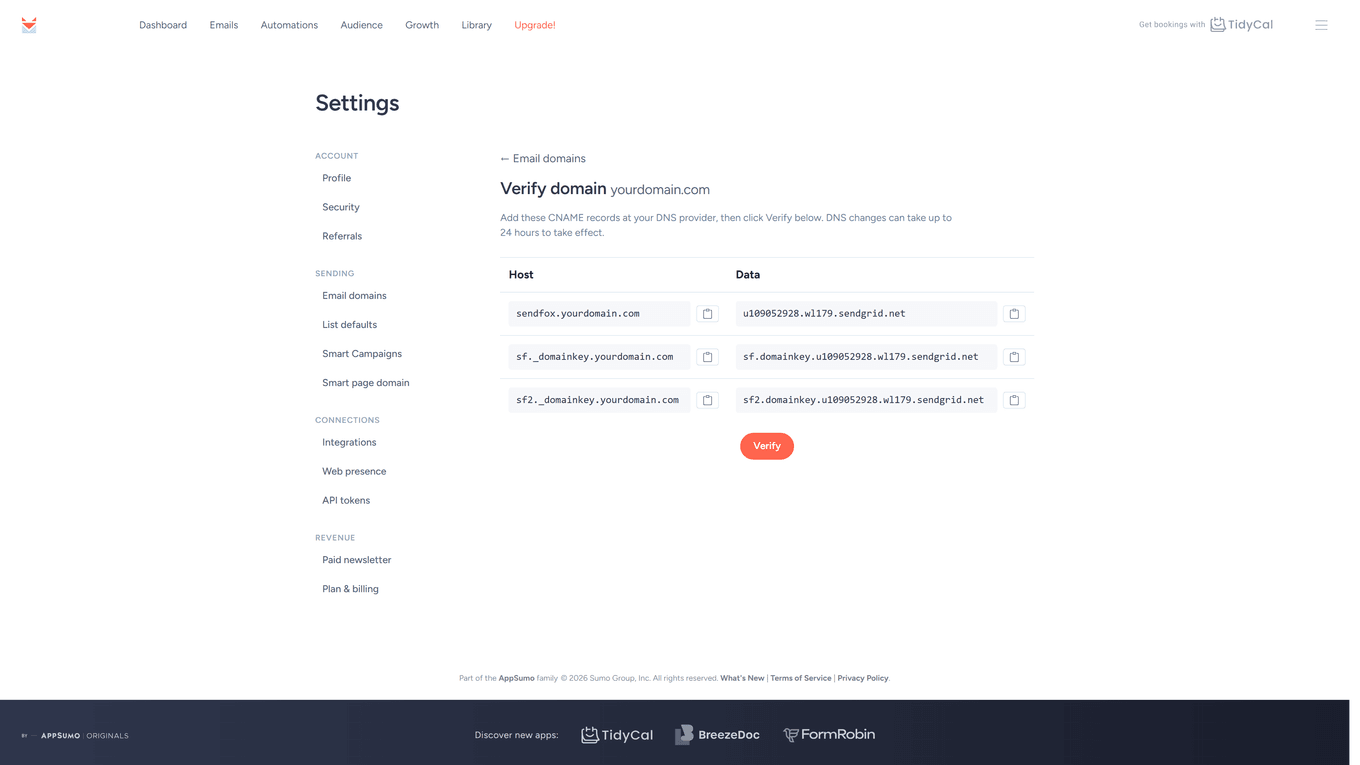
Domain validation works on every plan, including Free. SendFox shows the full Host values on the Verify domain page:
What should I enter at my DNS host?
For example, if you were validating yourdomain.com, SendFox would give you CNAME entries like these:
| Host | Data |
|---|---|
| sendfox.yourdomain.com | u12345678.wl123.sendgrid.net |
| sf._domainkey.yourdomain.com | sf.domainkey.u12345678.wl123.sendgrid.net |
| sf2._domainkey.yourdomain.com | sf2.domainkey.u12345678.wl123.sendgrid.net |
At DreamHost, NameCheap, Google, or GoDaddy, enter the Host without your domain (the Data values stay exactly as shown):
| Host | Data |
|---|---|
| sendfox | u12345678.wl123.sendgrid.net |
| sf._domainkey | sf.domainkey.u12345678.wl123.sendgrid.net |
| sf2._domainkey | sf2.domainkey.u12345678.wl123.sendgrid.net |
Tip: use the copy buttons next to each value on the Verify domain page, then delete the .yourdomain.com part from the Host before saving the record.
The two _domainkey records are your DKIM records, so you don’t add separate SPF or DKIM entries — see Do I need SPF or DKIM records for SendFox?
Troubleshooting
The records still won't validate
- DNS changes can take up to 24 hours to take effect. SendFox shows which specific record failed under each row on the Verify domain page.
- For other causes — stale records, proxied DNS, typos — see Why is my SendFox domain validation not working?
I'm not sure if my host auto-appends the domain
- After saving, look at how your host displays the record. If it shows sendfox.yourdomain.com.yourdomain.com, trim the Host to just sendfox. If it shows sendfox.yourdomain.com, it's correct.
I removed the domain and re-added it
- Re-adding a domain generates new CNAME values — the old ones are no longer valid. Delete the previous entries at your host and add the new ones exactly as shown on the domain's page in SendFox.
- Watch the auto-append behaviour again when you do this: the host rules described above apply to the new records too.
- Full walkthrough: How do I validate my sending domain in SendFox?
SendFox says “Enter just the domain”
- You typed an email address. Enter only the domain, for example yourdomain.com.
- If you paste a website address, SendFox keeps just the domain and drops a leading “www.”.
Still stuck? Email support@sendfox.com with your domain, your DNS host and a screenshot of the Verify domain page showing the failed record, or browse more answers at help.sendfox.com.
Frequently Asked Questions
Where do I get my CNAME entries in the first place?
From the Verify domain page, after adding your domain under Settings → Sending → Email domains — the full walkthrough is in How do I validate my sending domain in SendFox?
Will my values match the example above?
Only the Host pattern: sendfox, sf._domainkey and sf2._domainkey are the same for everyone, while the Data values are unique to your account — always copy your own from the Verify domain page.
My DNS is hosted somewhere else — does this apply?
Often, yes. Many other DNS providers also add your domain to the Host for you. If validation fails with the full Host value, try it without your domain.
Do the Host names change if I re-add my domain?
No. The Host names keep the same pattern, but the Data values are new — copy them again from the Verify domain page and replace the old entries at your host.